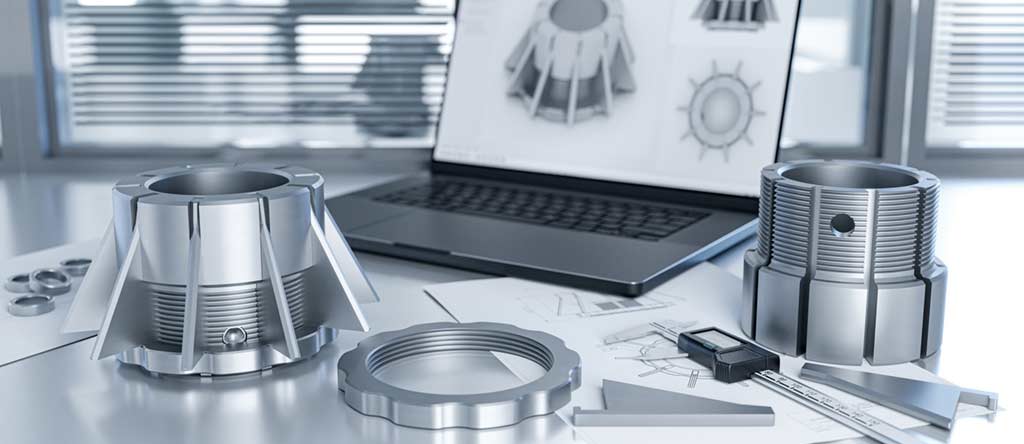
Here’s a scenario that happens constantly in product development.
You’ve got a design. Looks good on screen. Simulations pass. Everyone’s excited. Then you build a prototype and discover it doesn’t fit, doesn’t function, or doesn’t survive the first test.
Frustrating? Absolutely. Expensive? Even more so.
The problem usually isn’t the design. It’s the prototype. If your prototype isn’t precise enough, you’re not testing your design—you’re testing the prototype’s flaws.
That’s why CNC machining dominates high-precision prototyping. Tolerances measured in microns. Real production materials. Parts that actually behave like the final product will behave.
Aerospace, automotive, medical devices, electronics—any industry where prototypes need to function, not just look good, relies on CNC.
Here’s why.
Snapshot
| Factor | What to Know |
| Prototype durability | Built for repeated testing. Not fragile display models. |
| Cost | Varies by complexity. Often cheaper than tooling for small runs. |
| Materials | Metals, plastics, composites—same as production |
| Tolerances | Micron-level. ±0.001″ typical for precision work. |
| Turnaround | Days, not weeks. Fast iteration is the whole point. |
Precision That Matters
CNC machines follow digital instructions. No interpretation. No approximation. The cutting tool goes exactly where the program tells it to go.
Tolerances measured in microns. That’s thousandths of a millimeter. The kind of precision where tiny deviations—invisible to the naked eye—can make the difference between a part that works and one that doesn’t.
Why does that matter for prototypes?
Because you’re testing your design, not your manufacturing process. If the prototype is sloppy, you can’t tell whether problems come from the design or from imprecise fabrication.
CNC removes that ambiguity.
Alignment checks work because the parts are actually aligned. Fit tests work because the dimensions are actually correct. Performance tests work because the prototype actually matches the CAD model.
I’ve seen engineering teams waste weeks chasing phantom problems in prototypes that turned out to be fabrication errors, not design flaws. CNC eliminates that entire category of confusion.
Real Materials, Real Results
One of CNC’s biggest advantages is material versatility.
Aluminum. Titanium. Stainless steel. Brass. Plastics. Composites. Whatever you plan to use in production, you can prototype in that same material.
That’s huge.
A prototype made from the actual production material behaves like the final product will behave. Same strength. Same weight. Same thermal properties. Same chemical resistance. Same fatigue characteristics.
Compare that to a 3D-printed plastic model of a metal part. Sure, it shows you the shape. But it tells you nothing about how the real thing will perform under load, at temperature, or in the actual operating environment. It’s a visual aid, not a test article.
CNC prototypes aren’t mockups. They’re functional parts you can actually test.
Stress tests. Thermal cycling. Vibration. Corrosion exposure. Fit checks with mating components. You run real tests and get real answers.
That testing fidelity catches problems early. Before you’ve committed to production tooling. Before you’ve ordered material. Before you’ve made promises to customers.
Repeatability Across Iterations
Prototyping isn’t usually a one-shot process.
You build version one. Test it. Find problems. Fix the design. Build version two. Test again. Repeat until it works.
That process only works if each version is consistent. If version two has different tolerances than version one, you can’t tell whether your design changes helped or the manufacturing variation just masked the problem.
CNC solves that.
Once a program is set, the machine produces identical parts every time. Version one matches version two matches version ten. The only variable is your design changes.
That consistency makes comparison straightforward. Did the change work? You can actually tell. Because everything else stayed the same.
I’ve worked with teams who ran five design iterations in a week. By Friday, they had a design that passed all tests. That speed comes from confident comparisons between consistent prototypes.
Speed and Cost Efficiency
CNC prototyping is fast.
Digital design to physical part in days. Sometimes hours for simple components. No waiting for tooling. No mold setup. No long lead times while someone builds dies you’ll only use once.
That speed matters when you’re iterating. Test today, modify tonight, machine tomorrow, test again. Rapid cycles compress development timelines dramatically. Projects that used to take months now take weeks.
I’ve seen teams go from concept to tested prototype in 72 hours. Try that with injection molding. You’d still be waiting for the mold quote.
Cost efficiency comes from several factors.
No tooling investment. Traditional prototyping often requires molds or dies that cost thousands and take weeks to build. CNC skips that entirely. Program the machine and go.
Minimal waste. Modern CAM software optimizes cutting paths. Material utilization is high. You’re not paying for mountains of scrap.
Reduced labor. Once the program runs, human involvement is minimal. The machine does the work while the operator handles other tasks.
For small runs and iterative development, CNC often costs less than alternatives while delivering significantly better results.
CNC vs. 3D Printing for Prototypes
3D printing has its place. But for functional prototypes, CNC usually wins.
| Factor | CNC Machining | 3D Printing |
| Tolerance | ±0.001″ | ±0.005–0.010″ |
| Materials | Metals, plastics, composites | Mostly plastics, some metals |
| Surface finish | Smooth, production-ready | Often needs post-processing |
| Durability | High, functional testing | Moderate, mostly visual |
3D printing is great for concept models and visual checks. When prototypes need to function, bear loads, or fit precisely, CNC is the safer choice.
What Affects Cost and Quality
Several factors influence prototype pricing and results.
Material choice matters. Exotic metals cost more but give real-world testing fidelity. Sometimes worth it. Sometimes overkill.
Design complexity matters. Intricate parts with tight features take longer to program and machine. More features, more time, more cost.
Tolerance requirements matter. Tighter specs require more careful machine calibration and slower cutting. Only specify tight tolerances where you actually need them.
Batch size matters. CNC is efficient for small runs. Larger batches spread setup costs further.
Understanding these trade-offs helps you get maximum value from your prototyping budget.
The Prototyping Process
Here’s how CNC prototyping typically works.
Step 1: Design in CAD. Create detailed 3D models with all required dimensions and tolerances.
Step 2: Select materials. Choose the same material planned for production to test real-world performance.
Step 3: Program the machine. CAM software converts the design into cutting instructions.
Step 4: Machine the prototype. CNC mills, turns, or cuts the part to specification.
Step 5: Inspect and test. Verify dimensions, fit, and performance.
Step 6: Iterate. Adjust the design based on results and repeat if needed.
Follow this process and each prototype is functional, reliable, and ready for meaningful testing.
Industry Trends
A few things shaping CNC prototyping right now.
Local manufacturing preference. Companies want nearby CNC shops for faster turnaround and easier communication. Shipping delays and quality control issues pushed that shift.
Hybrid approaches. Combining CNC with 3D printing—print for early concepts, CNC for functional prototypes. Best of both worlds.
Sustainability focus. Optimized cutting paths reduce waste. Careful material planning minimizes environmental impact.
Speed keeps increasing. What took weeks now takes days. Competitive pressure drives that acceleration.
FAQs
Which industries use CNC prototyping most?
Aerospace, automotive, medical devices, electronics—any industry where prototypes need precision and functional testing capability.
How fast can a CNC prototype be produced?
Small to medium parts often ship within a few days. Complex components might take a week. Rush orders are usually possible.
Can CNC machine plastics?
Absolutely. Wide variety of plastics and composites. Makes prototypes more realistic when that’s the production material.
Is CNC cost-effective for low-volume runs?
Yes. No expensive molds or tooling required. Ideal for testing and small batch production.
How precise are CNC prototypes?
Tolerances in microns. Parts match CAD models exactly. That’s the whole point.
When should I use 3D printing instead?
Early concept visualization. Visual models where fit and function don’t matter yet. Once you need functional testing, switch to CNC.
What file formats do CNC shops need?
STEP and IGES are most common. Solid-model CAD files work best. Include drawings with critical dimensions and tolerances if you have them.
Can CNC prototypes be used as production parts?
Often, yes. If the prototype passes testing and uses production material, it might be perfectly suitable for actual use. Many companies run small production batches on CNC.
Why Styner Machine Tools
Styner Machine Tools specializes in CNC high-precision prototyping.
Metals, plastics, composites. Prototypes that match your exact specifications. Fast turnaround so you can iterate quickly and confidently.
When your prototypes need to actually work, Styner delivers.